Guide
Deploy any Helm chart on Wodby
Use Wodby CLI to inspect a Helm chart, scaffold a custom service manifest, keep it in Git, import it into Wodby, and add it to a stack.
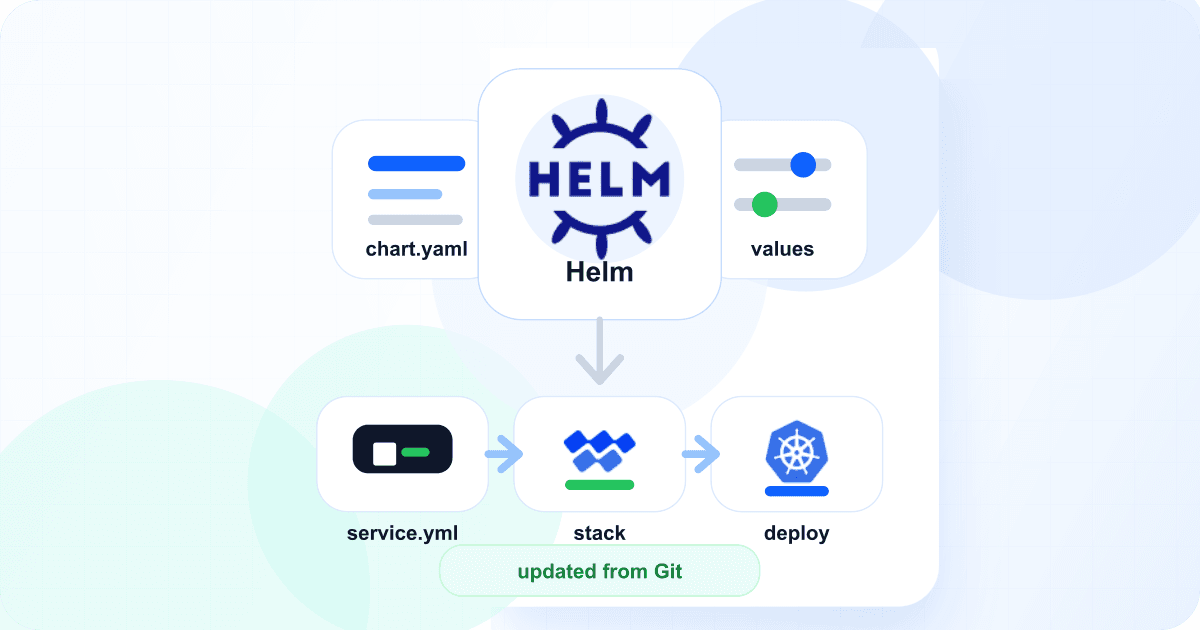
Wodby deploys non-external services with Helm. A custom service manifest points Wodby at the chart, pins the chart version, and maps Wodby concepts such as endpoints, workloads, resources, volumes, and environment variables to Helm value paths.
Creating a service makes it available to your organization or project, but does not deploy it by itself. After the service is created, add it to a new stack from scratch or to an existing stack, including a stack you started from the catalog. Each app environment created from that stack gets an app service for the chart, and that app service can still override Helm values for a specific environment.
What you need
- A Helm chart available from an OCI registry or Helm repo.
- A pinned chart version and the chart values you want Wodby to manage.
- A Git repository connected to Wodby through a Git integration.
- Wodby CLI configured with an API key for scaffolding, validation, import, and stack changes.
- Permission to import custom services and edit stacks in your Wodby organization or project.
Recommended path: CLI and Git
Use the CLI to generate and review the service manifest, commit it to Git, then import that Git source into Wodby. For maintained services, Git is the best source of truth: changes can go through pull requests, releases can be tagged, and rollbacks stay straightforward.
Two service creation alternatives are still available:
- Dashboard import from Git creates the same Git-backed service as the CLI import command. Use it when the first setup should happen in the UI.
- Local manifest creation works for quick tests. Wodby creates the service from the uploaded manifest, but does not track a Git source.
Helm scaffolding is separate from service creation. It only generates the manifest file used by the Git import flow.
Start from Wodby examples
Before writing a service from scratch, check the public Wodby repositories for working examples and boilerplates:
- wodby/services is the public index of Wodby services. It lists the services in the catalog and links to their individual GitHub repositories, so you can compare your manifest with existing Wodby-managed services.
- wodby/service is the boilerplate for a new Git-backed Wodby service. Use it as a minimal
service.yml, build files, and README structure. - wodby/charts contains Wodby's public Helm charts, including
statefulandstatelessboilerplate charts you can use when you need to publish your own chart instead of wrapping a third-party chart.
How service.yml is organized
A Wodby service template is more than a pointer to a Helm chart. It defines the service identity, the rendered Kubernetes objects Wodby should understand, and the controls that stack and app users can manage later.
- Identity fields such as
name,title,icon,type,labels,options,from, andupdatedefine how the service appears, whether it inherits another service, and how Wodby versions it. - Runtime shape fields such as
workloadsandendpointstell Wodby which rendered workloads and services belong to this chart. - The
helmsection defines the chart source, chart name, version, default values, optional CRDs, and image pull secret path. - Configuration fields such as
env,settings,tokens,annotations,configs, andcertsdescribe values Wodby can generate, store, expose, or template into the chart. - Composition fields such as
links,integrations, andkubernetesdescribe dependencies on other services, external providers, or cluster infrastructure. - Operational fields such as
build,actions,cron,imports,backups, andderivativesare for images Wodby builds, user-triggered commands, scheduled commands, data workflows, and related service variants.
Add only the sections your chart needs. For storage-backed charts, design storage explicitly in the service template and app workflow; Wodby does not support resizing existing persistent storage through Helm overrides, and app-level Helm values should not be used as a storage resize mechanism.
Repository layout
Put the service manifest in Git. Wodby can import a root service.yml directly. When a repository contains multiple services, add index.yml and list the service directories:
wodby-helm-services/
  index.yml
  meilisearch/
    service.yml
services:
  - meilisearch
The stack can stay dashboard-managed. If you already maintain a Git-backed custom stack, reference the imported service in stack.yml.
Inspect with Helm and Wodby CLI
Before scaffolding service.yml, inspect the chart values and render the chart locally. The example below wraps the official Meilisearch Helm chart, which exposes a StatefulSet, a ClusterIP Service on port 7700, image settings, pod labels, pod annotations, environment variables, ServiceMonitor settings, and resources.
helm repo add meilisearch https://meilisearch.github.io/meilisearch-kubernetes

helm show values meilisearch/meilisearch \
  --version 0.33.0 > values.yaml

helm template wodby-validation meilisearch/meilisearch \
  --version 0.33.0 \
  --set environment.MEILI_ENV=development
Scaffold the service manifest
Start by generating the service manifest with Wodby CLI. The command renders the chart, detects workloads and Kubernetes Services, and writes a starting service.yml. It only writes the file; the Wodby service is created later during import.
wodby helm inspect \
  --source https://meilisearch.github.io/meilisearch-kubernetes \
  --chart meilisearch \
  --version 0.33.0

wodby helm scaffold-service \
  --source https://meilisearch.github.io/meilisearch-kubernetes \
  --chart meilisearch \
  --version 0.33.0 \
  --service-name custom-meilisearch \
  --service-title "Custom Meilisearch" \
  --service-type search \
  --out meilisearch/service.yml
Pass --values-yaml values.yml when the chart needs non-default values to render the workload shape Wodby should model. Treat warnings about multiple workloads, CRDs, hooks, persistent volume claims, or cluster-scoped resources as a sign that the generated file needs manual changes or that the chart may fit better as a stack or infrastructure service.
Review or write service.yml
After scaffolding, review meilisearch/service.ymland adjust it for the chart. If you skip scaffolding, create this file manually instead. Here is a trimmed example for a Wodby service that points to a third-party chart, exposes an HTTP endpoint, and maps workload controls into chart values.
name: custom-meilisearch
icon: search
type: search
title: Custom Meilisearch
scalable: false
labels:
  - meilisearch

endpoints:
  - name: http
    main: true
    ports:
      - name: http
        number: 7700
        protocol: http
        main: true

helm:
  name: meilisearch
  source: https://meilisearch.github.io/meilisearch-kubernetes
  chart: meilisearch/meilisearch
  version: 0.33.0
  values:
    - name: environment.MEILI_ENV
      value: development
    - name: environment.MEILI_NO_ANALYTICS
      value: true
    - name: serviceMonitor.enabled
      value: false

workloads:
  - name: main
    kind: statefulset
    primary: true
    selector:
      matchLabels:
        app.kubernetes.io/name: meilisearch
        app.kubernetes.io/instance: "{{helm.release}}"
    containers:
      - name: meilisearch
        image: getmeili/meilisearch
        helm:
          resources: resources
          envKV: environment
          image:
            repository: image.repository
            tag: image.tag
            pullPolicy: image.pullPolicy
    helm:
      labels: podLabels
      annotations: podAnnotations
If you scaffolded the file, edit that output instead of creating another manifest. When it matches the chart and the Wodby controls you need, import it from Git.
Import the service with Wodby CLI
After the manifest is reviewed, commit it to the connected Git repository. If the repository contains multiple services, keep the index file at the repository root so Wodby can discover each service directory.
wodby service import \
  --org 123 \
  --integration github-main \
  --remote-git-repo acme/wodby-helm-services \
  --git-ref v1.0.0 \
  --git-ref-type tag \
  --wait

wodby service import \
  --org 123 \
  --project 456 \
  --integration github-main \
  --remote-git-repo acme/wodby-helm-services \
  --git-ref main \
  --git-ref-type branch \
  --wait
Use a semantic-version tag for controlled releases. Use a branch when the service should follow a development branch. Both commands create a Git-backed service; the dashboard flow named New service from Git does the same import without the terminal.
For a quick test that should not stay linked to Git, create the service from the local manifest instead:
wodby service validate-manifest meilisearch/service.yml --org 123

wodby service create-from-manifest meilisearch/service.yml \
  --org 123 \
  --version 1.0.0

wodby service create-from-manifest meilisearch/service.yml \
  --org 123 \
  --project 456 \
  --version 1.0.0
Add --include for referenced files such as configs or Dockerfiles when the manifest points to local paths. If validation fails, use the task or command output to find the invalid chart reference, value path, workload selector, or endpoint mapping before creating the service.
Add it to a stack
Add the created service to a stack draft with Wodby CLI:
wodby stack service create \
  --stack stack_123 \
  --service service_456 \
  --name search \
  --title "Custom Meilisearch" \
  --replicas 1
Dashboard alternative:
- To build a stack yourself, go to Stacks, choose New stack from scratch, and add the custom Meilisearch service.
- To extend an existing stack, open the stack, customize it if it came from the catalog, then add the service from the stack services view.
- Configure the stack service name, title, required flag, endpoint behavior, volumes, and any stack defaults you want every new app environment to inherit.
- Use the stack service Helm tab for chart values that should apply only to this service in this stack, then publish the stack draft.
Check the services catalog first
Wodby already provides ready-made services for common application dependencies. Couldn't find a service you need but think it should be in our catalog? Message us and let us know.
Create or upgrade app environments
Create a new app environment from the stack or upgrade an existing app environment to the new stack revision. Wodby creates an app service from the stack service and deploys the chart with service defaults, stack overrides, and app-specific overrides resolved for that environment.
For one environment only, open the app service Helm tab and add an app-service Helm value. For example, enable the chart's ServiceMonitor only in production when that cluster has Prometheus Operator support:
Name: serviceMonitor.enabled
Value: true
Secret: off
Environment Type: Prod
Keep the service updated from Git
When you change the service manifest, chart version, selectors, or value mappings, make the change in Git first. Then update Wodby from that source instead of editing an imported revision in place:
- Commit the change and create a new Git tag.
- Open the service in Wodby, go to Edit service, choose the tag or branch, and submit the update.
- Wodby imports a new service revision and runs the same Helm validation again.
- Update each stack that uses the service to the new service revision, review stack-service Helm values, and publish the stack draft.
- Upgrade app environments that should receive the new chart or mapping changes.
You can also enable Git auto-update for the service. Branch-backed services update when Wodby receives a matching push for the tracked branch. Tag-backed services can follow newer semantic version tags, with patch, minor, and major updates controlled separately.
Auto-update creates a new service revision. It does not redeploy apps on its own. Stacks that use the service still move to the new service revision through a stack update, and app environments still move through a stack upgrade.
For service auto-update, review manifest changes in pull requests, release with semantic-version tags, allow automatic patch or minor revisions only when they match your release process, and keep major updates manual.
Git-backed custom stacks can also be updated from Git. Use that when the service reference and stack defaults live in stack.yml; otherwise, dashboard-managed stacks can stay fully dashboard-managed.
Value precedence
Helm values are layered from broad defaults to app-specific overrides. Service manifest defaults come first. Stack-wide values and stack-service values are added next. App-service Helm values are applied last, so they are the right place for environment-specific changes.
- Use
service.ymlfor safe defaults that belong to the chart wrapper. - Use the stack service
Helmtab for defaults that should apply to every new app environment created from that stack. - Use the app service
Helmtab for one app environment or one environment type. - Mark sensitive values as secrets in the dashboard when the chart supports rendering them safely.
Buildable app charts
If the chart runs an image built by Wodby CI or external CI, add a build section and map image value paths under the buildable container. Wodby will publish the built image and inject the released image reference into the chart:
build:
  dockerfile: Dockerfile
  connect: true

workloads:
  - name: main
    kind: deployment
    primary: true
    selector:
      matchLabels:
        app.kubernetes.io/instance: "{{helm.release}}"
    containers:
      - name: app
        image: example/app
        build: true
        helm:
          image:
            registry: image.registry
            repository: image.repository
            tag: image.tag
            pullPolicy: image.pullPolicy
          env: extraEnvVars
          resources: resources
Use this only for services that build application images. For off-the-shelf charts such as search engines, queues, object storage, and operators, the chart image can stay fully chart-managed.
Troubleshooting
- If service import fails, verify the chart source, chart name, pinned version, and every explicit Helm value path.
- If Wodby cannot resolve a workload, render the chart locally and update
workloads[].selector.matchLabelsso it matches exactly one rendered workload of the declared kind. - If endpoints do not route, confirm the endpoint port matches the chart-rendered Kubernetes Service and set
endpoints[].workloadfor multi-workload charts. - If a value differs by environment, add an app-service Helm value instead of cloning the whole stack.
- If a chart upgrade changes value paths or labels, update the service manifest, import a new service revision from Git, update stacks that use it, and then upgrade app environments.
For the full service creation workflow, see the service creation docs. For the field reference, see the service template docs, service Helm docs, the automatic updates overview, and stack docs.