Automatic updates
Stay secure with automatic stack updates and controlled maintenance
Receive maintained stack and service updates, review each new revision, and choose when environments move forward.
- Turn upstream fixes into reviewable stack revisions
- Roll updates out environment by environment
- Schedule automatic work in timezone-aware maintenance windows
Receive security and maintenance updates as new stack revisions
Keep upstream stack and service fixes moving without silently changing running applications.
Wodby can follow Git-backed stack templates, newer service revisions, and updates from a copied catalog stack. Eligible changes create a new stack revision for review; running environments stay on their current revision until their rollout policy moves them forward.
- Follow an allowed branch or semantic-version tag for Git-backed stack templates.
- Create a new stack revision when eligible service updates become available.
- Sync copied stacks with their origin while preserving local overrides by default.
- Pin components that require explicit review before they change.
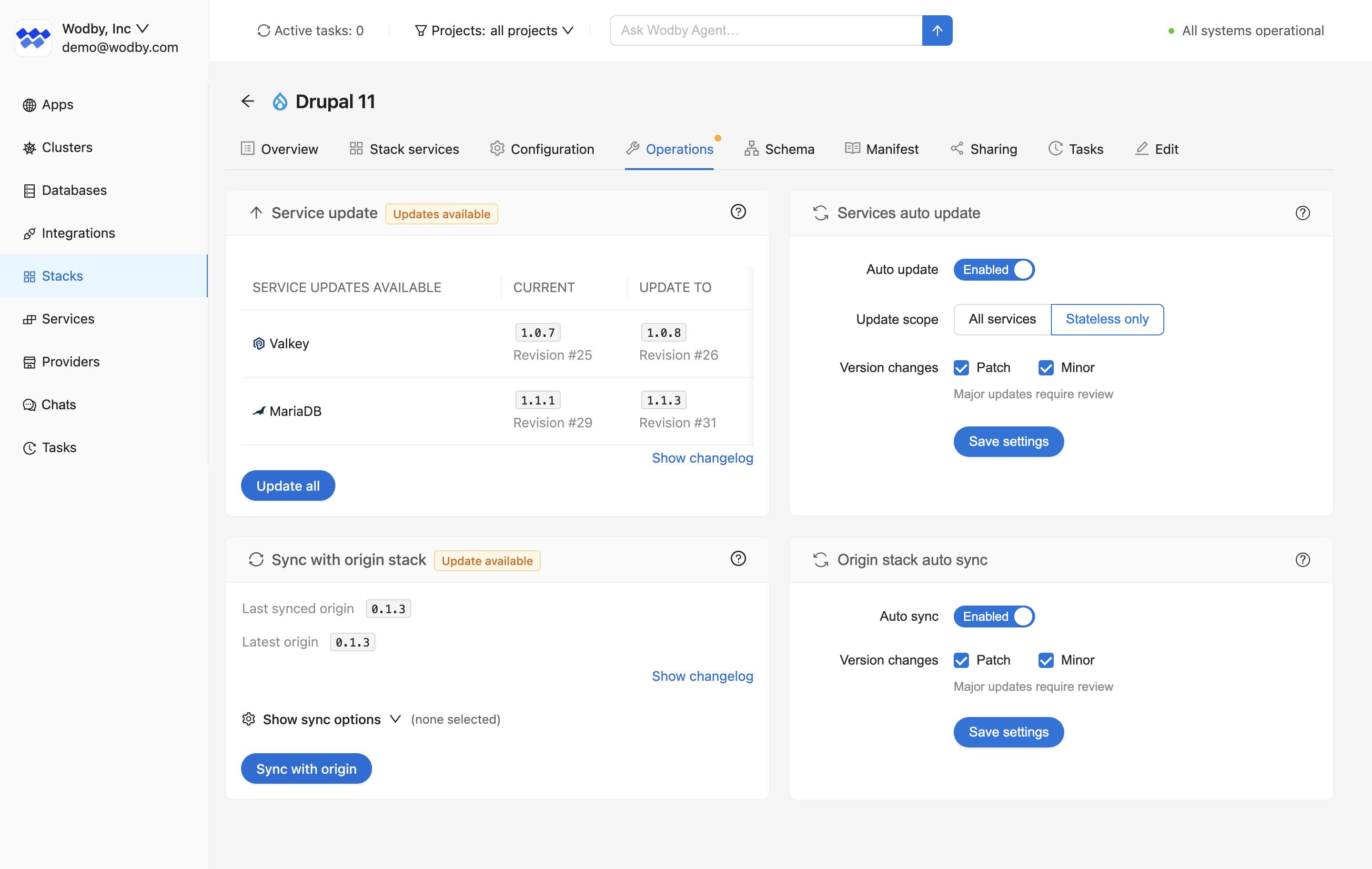
Review what changed before an upgrade reaches an environment
Compare current and target revisions with available service release notes.
Upgrade changelogs identify services that will be added, removed, or moved to another revision and collect published release notes when the service provider makes them available. This keeps routine updates reviewable instead of turning them into a blind version bump.
Roll updates out environment by environment
Development, staging, and production do not have to adopt a new revision at the same time.
Configure automatic stack upgrades per app environment. Lower environments can follow new revisions quickly while production stays behind a maintenance window or manual approval, depending on the risk the team is prepared to accept.
- Choose automatic or manual adoption for each environment.
- Preserve app-environment-specific settings according to the saved upgrade policy.
- Review warnings when a revision introduces configuration that still needs an environment-specific value.
Choose when automatic maintenance may start
Timezone-aware windows keep scheduled changes inside the hours and weekdays that fit each environment.
Choose the days, start and end times, and an IANA time zone for supported automatic upgrades and backups. Different environments can use different windows even when they share the same stack.
- Use local maintenance hours instead of a single global schedule.
- Support weekday, weekend, daytime, and overnight windows.
- Defer eligible work when the window is closed and reconsider it in a later window.
- Run a manual upgrade when needed; maintenance windows do not block manual work.
A task that starts inside its window continues normally if it runs past the end. Catalog updates that do not change running workloads can still create new revisions at any time; the app environment window controls when one of those revisions reaches a running environment.
Keep automatic work visible through tasks and notifications
Automation should reduce maintenance, not hide operational changes.
Automatic updates run as Wodby tasks, the same way manual updates do. Task history and logs show what ran, whether warnings were recorded, and whether follow-up work is needed before deployment can continue.
- Review update and upgrade task history when an automatic workflow runs.
- See the task start time, configured window, time zone, and selected days in automatic-upgrade notification emails.
- Keep production review boundaries by enabling automation only where the saved policy matches the risk.
For a release-oriented view of app changes, pair automatic updates with CI/CD deployment controls.
Next step
Run automation on your schedule
Choose when workload changes may start, review available upgrade notes, and use task history and notifications to see what ran.