Product update
Wodby app instances are now app environments
Wodby now calls each deployable copy of an app an app environment. We are also replacing custom organization environments with a single fixed set of environment types, while keeping existing apps and integrations compatible.
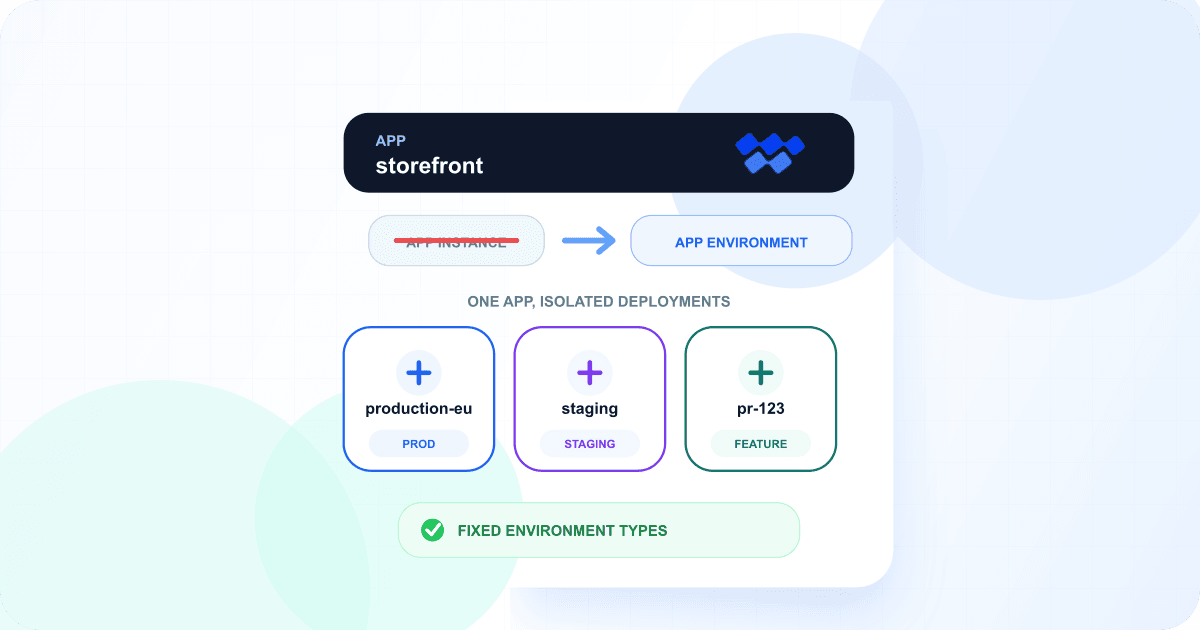
This is primarily a clearer product model, not a new kind of deployment. The resource previously shown as an app instance is still the same isolated application deployment, with the same services, routes, builds, backups, cluster, and stack revision. Its canonical name is now app environment.
At the same time, the separate organization-level environment record was doing little more than attaching a name to one of a few known classifications. Cluster restrictions, integration availability, and backup policies then had to mix environment records with environment types. The new model makes the classification itself the shared contract.
The model now has one deployable environment
App
The top-level application that groups its environments and shared stack.
Example: storefront
App environment
One isolated deployment of the app on a Kubernetes cluster.
Example: production-eu
Environment type
The fixed classification used for policy and environment-specific configuration.
Example: prod
A concrete example
The storefront app can have app environments named production-eu, production-us, staging, and pr-123. Their environment types can be prod, prod, staging, and feature. Multiple app environments can share a type without creating another organization-level object.
The fixed environment types are prod, staging, test, dev, and feature. They drive environment-specific stack and service configuration, cluster placement, integration and managed database availability, organization backup presets, and production-safe defaults.
What changed in the dashboard
- Apps now show Environments instead of Instances.
- App environment pages use canonical
/environments/URLs. Existing/instances/links redirect to the matching page. - The organization-level environment-management page has been removed. Environment types are fixed and do not need to be created, renamed, or deleted.
- Cluster, integration, managed database, and backup-preset restrictions now select environment types directly.
Canonical runtime environment variables
Runtime containers and CI builds now receive one consistent app environment identity:
| Variable | Value |
|---|---|
WODBY_ENV_ID | App environment ID |
WODBY_ENV_NAME | App environment machine name, such as production-eu |
WODBY_ENV_TYPE | Fixed type: prod, staging, test, dev, or feature |
Check how you use WODBY_ENV_NAME
Before this change, WODBY_ENV_NAME contained the assigned organization environment record name. It now contains the app environment machine name. Application code that needs the deployment classification should use WODBY_ENV_TYPE, whose meaning is unchanged.
The former app-instance variables remain available as deprecated aliases during the compatibility period: WODBY_APP_INSTANCE_ID has the same value as WODBY_ENV_ID, and WODBY_APP_INSTANCE_NAME has the same value as WODBY_ENV_NAME. New application code and automation should use the WODBY_ENV_* names.
API and automation compatibility
New integrations should use the app-environment contracts. The previous app-instance contracts remain available and are deprecated so existing clients can migrate gradually.
| Area | Canonical | Compatibility |
|---|---|---|
| REST API | /v1/app-environments | /v1/app-instances |
| GraphQL type | AppEnvironment | AppInstance |
| GraphQL queries | appEnvironment, appEnvironmentByName, appEnvironments | appInstance, appInstanceByName, appInstances |
| Create mutation | newAppEnvironment | newAppInstance |
Environment classifications in new API requests use the fixed EnvType enum and fields such as environmentType, envType, primaryEnvType, and allowedEnvTypes. Legacy environment-ID fields remain compatible, but one request cannot mix a legacy ID field with its type-based replacement.
Existing Wodby CLI commands and flags such as wodby instance create, --instance, and --instance-title continue to work. They create the resource now described in the product as an app environment. Existing task, status, and event wire values also remain stable during the compatibility period.
What happens to existing apps
- Existing deployments are not recreated, moved, or redeployed just because the terminology changed.
- App environment names, IDs, namespaces, services, routes, volumes, and stack revisions remain the same.
- Existing cluster and integration restrictions and organization backup presets are carried forward to the corresponding fixed environment types.
- Old dashboard links, API operations, and app-instance runtime variables remain available for compatibility.
What you should update
- Use app environment in internal documentation, runbooks, and user-facing integrations.
- Move application code and CI automation to
WODBY_ENV_ID,WODBY_ENV_NAME, andWODBY_ENV_TYPEwhen convenient. - Update REST and GraphQL clients to the canonical app-environment contracts before the compatibility aliases are eventually removed.
- Use environment types—not organization environment IDs—when defining placement and availability restrictions.
Most teams do not need to take immediate action. The compatibility layer is there to make this a gradual naming migration while the dashboard and documentation use one clearer model everywhere.
Read more
Explore the app environments feature overview, read the app model guide, review environment types, and see the runtime environment variable reference.