Guide
Deploy to Kubernetes from GitLab CI with Wodby
Use GitLab CI for the pipeline and Wodby CLI for the stack-aware build, push, and Kubernetes deployment steps.
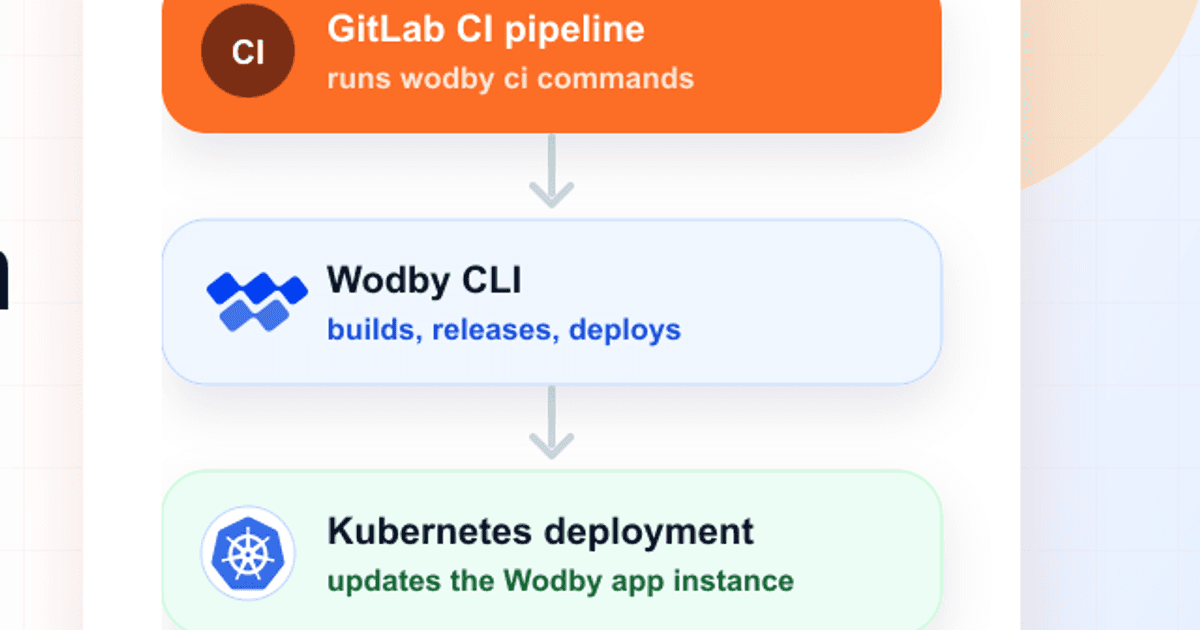
Start from an existing Wodby app with a buildable app service connected to a GitLab repository. The example runs on the main branch, builds through Docker-in-Docker, pushes images, and deploys them to the selected Wodby app environment.
Git repository and CI provider access are optional
Use the GitLab CI integration when Wodby should poll job status and start or rerun pipeline jobs from the dashboard.
If you do not want to connect a GitLab repository or grant Wodby access to the GitLab CI API, create a Custom CI integration instead. Wodby CLI can still create builds from the app service ID, but Wodby will not poll provider status or start and rerun provider jobs from the dashboard.
What you need
- For the full provider-connected flow, a GitLab integration in Wodby with Git and CI support. GitLab.com can use OAuth2 or token authentication. Token authentication also works for GitLab.com and is required for self-hosted GitLab.
- A Wodby app environment using GitLab CI as its CI integration, or Custom CI when the pipeline should stay outside Wodby provider API control.
- A buildable app service. Connect it to the GitLab repository for full provider features, or leave it unlinked when a Custom CI pipeline supplies the checkout and metadata.
- A Wodby API key from User API keys.
- The buildable app service ID from the service overview in Wodby.
Set up the app in Wodby
For the provider-connected path, choose GitLab CI as the CI integration on the first step. Later, on the build source step, choose Connect git repository for each buildable app service and select the GitLab integration and repository that should be built by this pipeline.
For self-hosted GitLab, create the integration with token authentication and specify the GitLab base URL. Leave the base URL empty for GitLab.com.
Add GitLab variables
In GitLab, open Settings > CI/CD > Variables and add WODBY_API_KEY as a masked variable. Mark it protected if this pipeline only runs on protected branches or tags.
You can store WODBY_APP_SERVICE_ID as a GitLab CI/CD variable too, or keep it in the pipeline file as shown below.
Add the pipeline
Create .gitlab-ci.yml:
image:
  name: wodby/wodby-cli:2.0
  pull_policy: always

services:
  - name: docker:dind
    alias: docker

variables:
  WODBY_APP_SERVICE_ID: "PASTE_APP_SERVICE_ID_HERE"

stages:
  - deploy

deploy_to_wodby:
  stage: deploy
  script:
    - wodby ci init --dind "$WODBY_APP_SERVICE_ID"
    - wodby ci run -- npm ci
    - wodby ci build
    - wodby ci push
    - wodby ci deploy
  rules:
    - if: '$CI_COMMIT_BRANCH == "main"'
Adjust the dependency step
The example uses npm ci. Replace that command with the dependency command your app needs, or remove it if the Docker build handles dependencies itself.
For a PHP service, use Composer instead:
- wodby ci run -s php -- composer install --prefer-dist -n --no-dev
Post-deployment scripts
If the repository contains .wodby/post-deployment.yml, wodby ci deploy runs those post-deployment steps by default after the app services are deployed. To skip them for a specific pipeline, replace the deploy command with:
- wodby ci deploy --skip-post-deploy
GitLab authentication
GitLab.com supports OAuth2 and token authentication. Token authentication works for both GitLab.com and self-hosted GitLab, and supports personal, group, and project access tokens.
For repository access, use read_api and read_repository. If you want the integration to be ready for future dashboard-triggered GitLab pipelines or job retries, use api instead of read_api. The token actor needs Developer access or higher and must be allowed to run pipelines for protected branches such as main.
What Wodby tracks
Wodby CLI reads GitLab CI metadata automatically and submits the build information back to Wodby, including the provider, commit SHA, ref, build number, pipeline ID, job ID, commit author, commit message, and post-deployment script information.
Wodby stores the GitLab pipeline ID as workflow metadata and the GitLab job ID as the tracked external build ID. That lets Wodby poll the job for build status and keep the deployment tied to the pipeline that produced it. The same metadata prepares the integration for dashboard-triggered GitLab builds in the future.
Troubleshooting
- If
wodby ci initfails, confirmWODBY_API_KEYis available to the job and has not been excluded by protected variable rules. - If Wodby cannot create a build, check that
WODBY_APP_SERVICE_IDis the buildable app service ID, not the app or app environment ID. - If Docker builds fail, confirm the GitLab runner supports Docker-in-Docker and that the
docker:dindservice is available to the job. - If Wodby cannot create a pipeline for a protected branch, check that the GitLab token actor is allowed to run pipelines for that branch.
- If expected post-deployment scripts do not run, confirm the file is committed at
.wodby/post-deployment.ymland that the deploy step is not using--skip-post-deploy.
For the generic third-party CI reference, see the Wodby third-party CI docs. For GitLab token and self-hosted setup details, see the GitLab provider docs. More pipeline examples for supported CI providers are available in github.com/wodby/wodby-ci.