Guide
Deploy to Kubernetes from GitHub Actions with Wodby
Use GitHub Actions for your pipeline and Wodby CLI for the stack-aware build, push, and Kubernetes deployment steps.
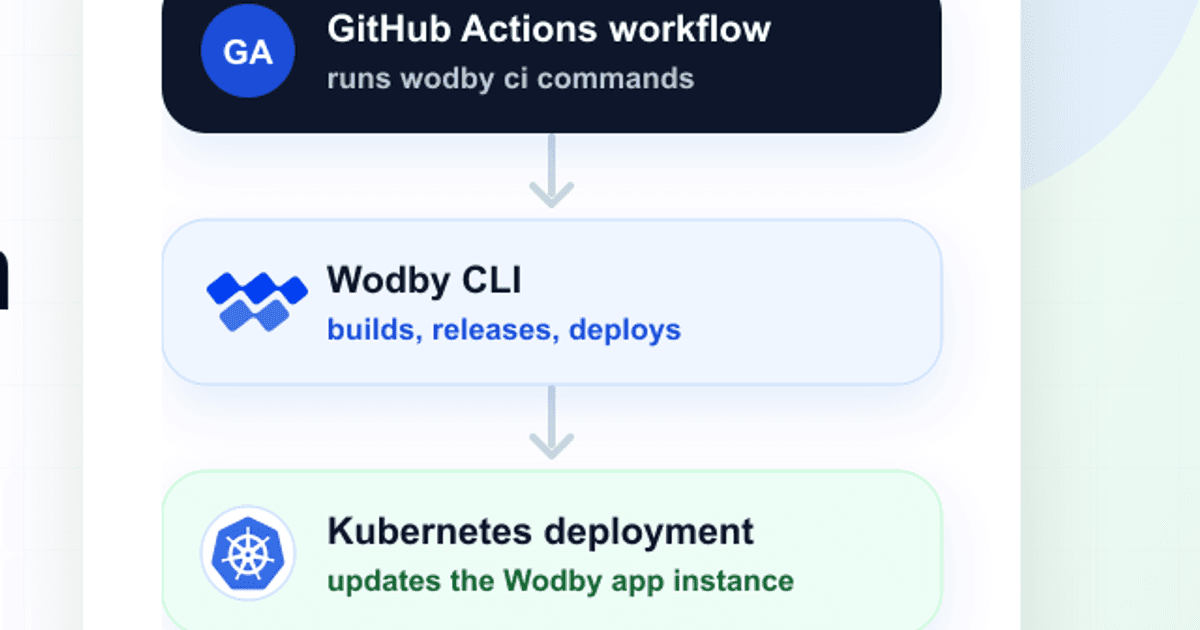
Start from an existing Wodby app with a buildable app service connected to a GitHub repository. The workflow below runs on pushes to main, can also be started manually, and deploys the pushed images to the selected Wodby app environment.
Git repository and CI provider access are optional
Use the GitHub Actions integration when Wodby should poll workflow status and start or rerun workflow jobs from the dashboard.
If you do not want to connect a GitHub repository or grant Wodby access to the GitHub Actions API, create a Custom CI integration instead. Wodby CLI can still create builds from the app service ID, but Wodby will not poll provider status or start and rerun provider jobs from the dashboard.
What you need
- For the full provider-connected flow, a GitHub integration in Wodby with Git and CI support. GitHub integrations use the Wodby GitHub App, so repository access is controlled during the GitHub App installation.
- A Wodby app environment using GitHub Actions as its CI integration, or Custom CI when the workflow should stay outside Wodby provider API control.
- A buildable app service. Connect it to the GitHub repository for full provider features, or leave it unlinked when a Custom CI workflow supplies the checkout and metadata.
- A Wodby API key from User API keys.
- The buildable app service ID from the service overview in Wodby.
Set up the app in Wodby
For the provider-connected path, choose GitHub Actions as the CI integration on the first step. Later, on the build source step, choose Connect git repository for each buildable app service and select the GitHub integration and repository that should be built by this workflow.
If the GitHub repository is not visible in Wodby, update the Wodby GitHub App installation in GitHub and grant access to that repository or account.
Add GitHub configuration
In the GitHub repository, add WODBY_API_KEY as an Actions secret. Add WODBY_APP_SERVICE_ID as an Actions variable. If the repository has multiple independently sourced buildable services, use the service ID for the service this workflow builds.
Add the workflow
Create .github/workflows/wodby.yml:
name: Deploy to Wodby

on:
  push:
    branches:
      - main
  workflow_dispatch:

permissions:
  contents: read

jobs:
  deploy:
    runs-on: ubuntu-24.04
    steps:
      - uses: actions/checkout@v6

      - uses: wodby/actions/setup-wodby-cli@v1
        with:
          api-key: ${{ secrets.WODBY_API_KEY }}
          app-service-id: ${{ vars.WODBY_APP_SERVICE_ID }}

      - name: Install dependencies
        run: wodby ci run -- npm ci

      - name: Build images
        run: wodby ci build

      - name: Push images
        run: wodby ci push

      - name: Deploy
        run: wodby ci deploy
Adjust the dependency step
The setup action restores npm's download cache when it finds a package-lock.json. Wodby CLI recognizes the Node.js service image and mounts that cache automatically. Replace npm ci with the command your stack needs, or remove this step if the Docker build handles dependencies itself.
For a PHP service, you may prefer to run Composer inside the PHP app service image:
      - name: Install PHP dependencies
        run: wodby ci run -s php -- composer install -n --no-ansi
For a static frontend that does not have a Node.js service in the stack, run the command with an explicit image:
      - name: Install dependencies with a custom image
        run: wodby ci run -i wodby/node:24 -- npm ci
Post-deployment scripts
If the repository contains .wodby/post-deployment.yml, wodby ci deploy runs those post-deployment steps by default after the app services are deployed. To skip them for a workflow run, deploy with:
      - name: Deploy without post-deployment scripts
        run: wodby ci deploy --skip-post-deploy
What Wodby tracks
Wodby CLI reads GitHub Actions metadata automatically and submits the build information back to Wodby, including the provider, commit SHA, ref, build number, workflow metadata, run ID, commit author, commit message, and post-deployment script information.
Wodby stores the GitHub Actions run ID as the external build ID and uses it to sync build status. Keep workflow_dispatch in the workflow if you want this workflow to be ready for dashboard-triggered builds from Wodby in the future. The Wodby GitHub App also needs repository access with Actions permissions enabled.
Troubleshooting
- If initialization fails, confirm
WODBY_API_KEYis a repository or environment secret available to the workflow. - If Wodby cannot create the build, check that
WODBY_APP_SERVICE_IDpoints to a buildable app service, not the app or app environment ID. - If Wodby cannot start a fresh GitHub Actions run, check that the workflow has
workflow_dispatchand that the GitHub App installation has Actions permissions. - If dependency commands fail, run them with the correct Wodby service image by passing
-s SERVICE, or use a custom image with-i IMAGE. - If expected post-deployment scripts do not run, confirm the file is committed at
.wodby/post-deployment.ymland that the deploy step is not using--skip-post-deploy.
For the generic third-party CI reference, see the Wodby third-party CI docs. For CLI flags and behavior, see the Wodby CLI docs. More pipeline examples for supported CI providers are available in github.com/wodby/wodby-ci.